
We will review how to configure presets for your most used order attributes to save time and speed up order entry.
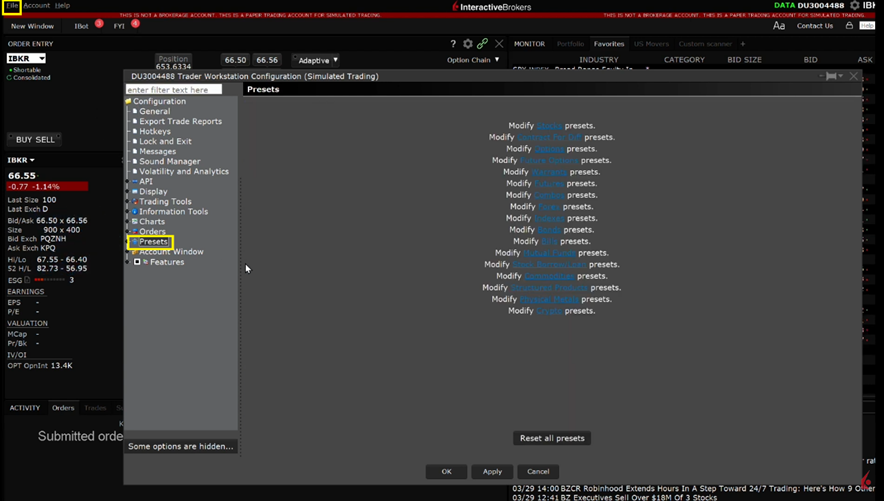
You will be presented with the list of available asset classes that Presets can be configured for. Presets can be set up for an asset class as a whole or for a specific ticker symbol. Click on the blue Stock hyperlink.
The available configurations for presets are grouped into basic categories such as Timing, Size, Primary Order attributes and attached Profit Takers or Stop Loss orders.
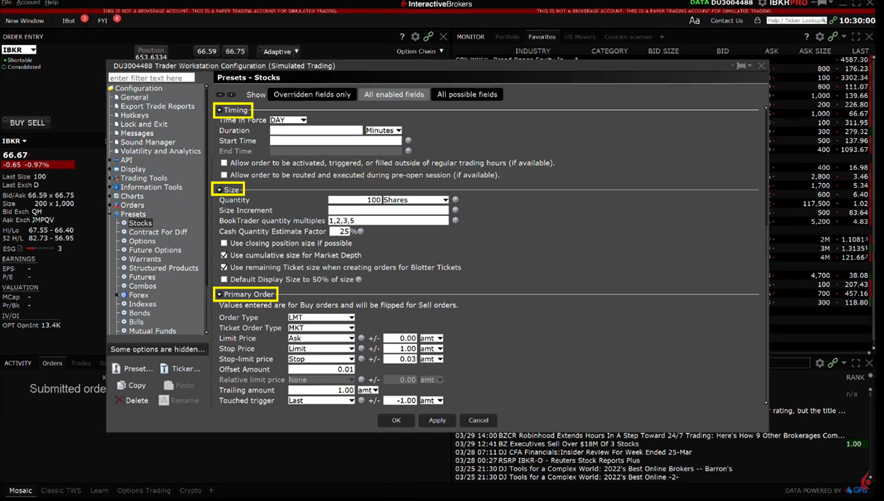
Presets also allow you to manage your Precautionary Settings which can be used as safety checks to avoid mistakenly entering larger orders than intended. If an order is entered for a value greater than your specified precautionary settings, you will receive a warning message within the Order Confirmation popup window prior to transmitting the order.
Source: (IBKR, 2023, Configuring TWS Presets; https://ibkrcampus.com/trading-lessons/configuring-tws-presets/ )