
The Interactive Brokers’ (IBKR) Advisor Portal enables to set up User Roles, which serve as templates to define the access levels for employees. Multiple user roles can be created for different positions within the company and used when employees are hired or change roles (IBKR Traders´Academy, s.f.). For example, an advisor can create a user role for the treasury department with funding capabilities or for an administrative employee with reporting access only. Access rights are organized into six categories: User Setting Access, Trading Access, Reporting Access, Funding Access, Account Settings Access, and Client Management Access.
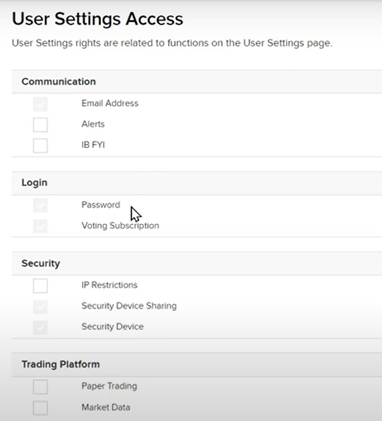
To create a new user role, the advisor clicks on the head & shoulders icon in the upper right-hand corner, selects Settings, and navigates to User Access Rights. By clicking the plus sign in the User Roles box, the advisor can start creating a user role, such as for a Junior Trading Employee. The advisor enters a name for the role and configures settings across multiple pages, including communication, login, security, trading platforms, reporting, funding, account settings, and client management. Once all settings are configured, the advisor can review and create the user role, which can then be assigned to multiple employees, ensuring consistent user rights for each job title (IBKR Traders´Academy, s.f.).
To create a new user, the advisor goes to the User and Access Rights page, clicks the plus sign next to Users, and creates a username and temporary password. The advisor designates the user as a security officer or an account representative, if necessary, enters contact information, and chooses whether the user is an employee. The advisor can then copy the access rights of an existing user, use a role, or create a new profile. Selecting “Use a Role” allows the advisor to choose a pre-configured role, such as Junior Trader, and apply the access rights to specific accounts or account types.
The advisor reviews the new user information and receives a confirmation number to verify their identity before adding the user. Depending on the selected access rights, additional documents for proof of identity and residential address may be requested. If trading access is selected, a Trader Authorization task must be signed, which will appear as a pending item under the notification bell icon for the primary user listed on the master advisor account (IBKR Traders´Academy, s.f.).