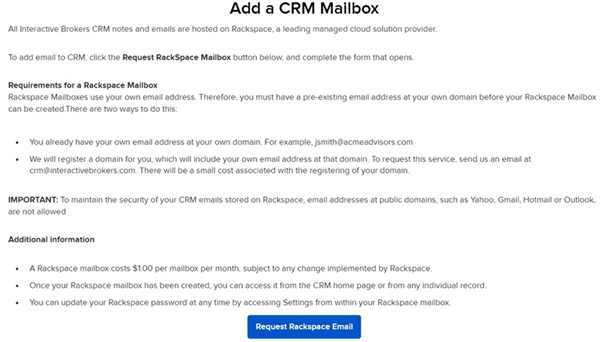
The IBKR Advisor Portal includes a comprehensive suite of Client Relationship Management (CRM) tools to assist financial advisors in managing client and prospective client information. For security purposes, some CRM tools, such as Notes, Workflows, Documents, and Calendar, are stored on Rackspace, a third-party cloud provider, at no additional cost to advisors. Advisors can activate these features by creating a Rackspace password through the home page or Settings. Once configured, advisors will have access to these tools without needing to input the password again.
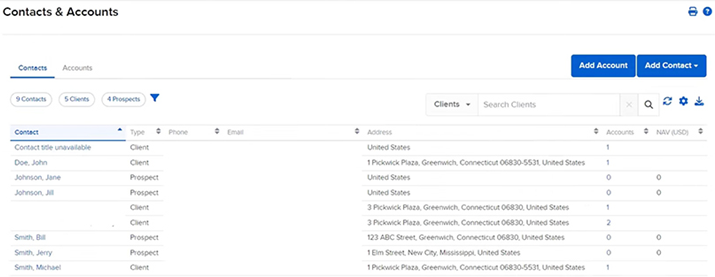
1. Contacts Page
The Contact’s page is a central hub for many CRM tools and client information. Accessible from the left side navigation menu, this page displays all client accounts, including opened and pending accounts, as well as prospective clients. Advisors can click on a client’s name in the Contact column to view detailed information and use sub-menu options for tools such as Transaction Status & History, reporting features, and additional CRM tools like the agenda page (IBKR Traders´Academy, s.f.).
2. Agenda Page
On the Agenda page, advisors can manage Workflows, Notes, Documents, and Events for specific client accounts or prospective clients. Workflows allow advisors to assign tasks to employees and monitor progress, with tasks organized into stages (IBKR Traders´Academy, s.f.). Advisors can prioritize tasks, set due dates, and assign them to specific team members.
The Notes panel enables advisors to add, edit, and delete notes for a client account, helping keep track of important client information and interactions. The Documents panel allows for the viewing, uploading, and deleting of documents, which are securely stored on Rackspace. The Events panel is used to schedule and manage upcoming events with clients, and these events can also be viewed collectively in the Calendar tool.

3. Calendar Tool
The Calendar tool, found under Administration & Tools, allows advisors to view and manage events for all clients. The calendar can be displayed monthly or as a daily list, and new events can be added directly from this page. This tool helps advisors keep track of all scheduled client interactions and important dates (IBKR Traders´Academy, s.f.).
4. Email Tool
The Email tool, also under Administration & Tools, integrates with Rackspace for secure email storage. Advisors must request a mailbox, and once created, the email functionality becomes accessible from the Dashboard. Advisors must use an established email address with a pre-existing domain, as public domains like Yahoo, Gmail, Hotmail, or Outlook are not supported (IBKR Traders´Academy, s.f.). There are some ongoing costs associated with integrating Rackspace email.