we will explore the essential components of TWS API Python programs, using the Contract Details request as an example. Key components include the EClient and EWrapper classes, which handle communication between the API program and TWS or the IB Gateway.
EClient and EWrapper Classes
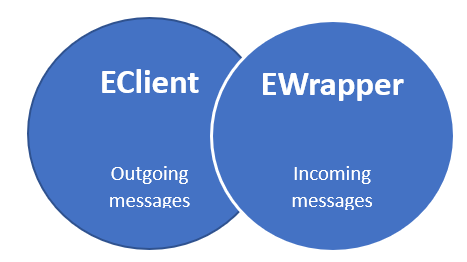
- EClient: Manages outgoing messages from the API program to TWS or the IB Gateway.
- EWrapper: Handles incoming messages from the Interactive Brokers server via TWS or IB Gateway.
For this lesson, Visual Studio Code will be used, but any development environment can be utilized. The API has been installed, and the python source directory (IBAPI) and python sample code directory (Testbed) have been opened.
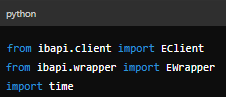
1. Importing Modules
We start by importing the necessary modules:
2. Creating a Combined Class
Next, we create a class that combines EClient and EWrapper:
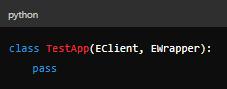
An instance of this class was created to use object-oriented programming.
3. Contract Details Method
An created an EWrapper object to handle Contract Details:
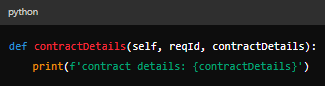
Additionally, an included the ´contractDetailsEnd´ method to disconnect the socket safely once all data is received.
4. Main Method
The Main method involves referencing the ´TestApp´ class, establishing a connection to TWS, and defining contract details:
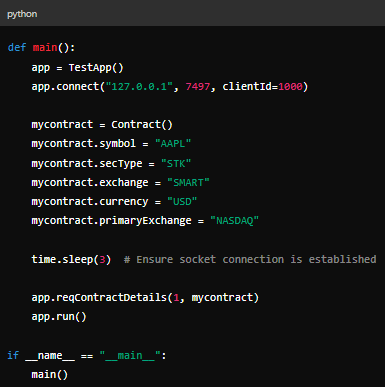
This requests details for the AAPL stock and receives the full contract details.
5. Requesting Specific Attributes
To request specific attributes, modify the ´contractDetails´ object:

Explore additional attributes in the ´contract.py´ file.
6. Option Contracts
To create an options contract:
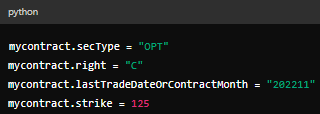
Specify exact expiration dates for more granular results.
7. Futures Contracts
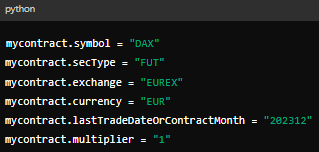
To create a futures contract: