
IBKR’s Advisor Portal offers Financial Advisors and Registered Investment Advisors (RIAs) tools to manage client applications effectively. Advisors can monitor the status of pending applications and have the capability to modify or cancel them as needed. Additionally, the portal provides the option to enable Client Activation Notifications, ensuring that new clients receive an email notification upon account approval.
- Viewing Pending Applications
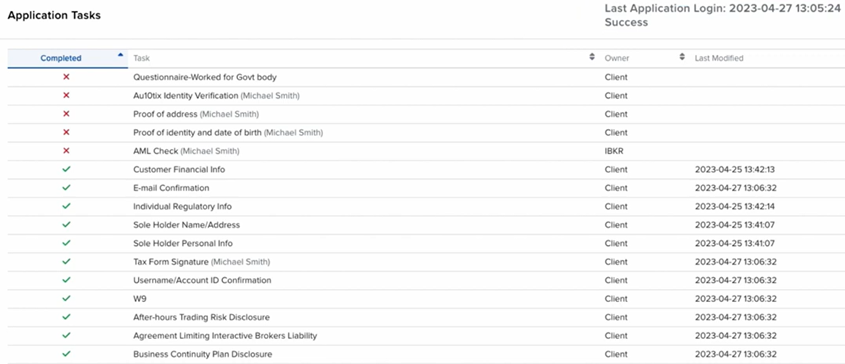
Advisors can track all pending applications on the home page of the Advisor Portal, specifically within the Pending Items box. To delve deeper into the status of an application, advisors can click the blue “Incomplete” link in the Status column, which redirects them to the Application Tasks page. Here, completed tasks are marked with a green checkmark, while pending tasks have a red “X” (IBKR Traders´Academy, s.f.). The Owner column indicates whether the client or IBKR needs to complete the task.
For fully electronic applications, advisors can see the client’s last login attempt in the top right corner of the Application Tasks page, helping them decide whether to follow up with the client. Advisors can also export the list of application tasks, cancel the application, or upload any required supplemental documents on behalf of the client.
For semi-electronic applications, advisors can use the Modify Application button to make necessary changes and upload documents. Once the application is approved and the account is opened, it will appear under the Recent Activity tab, which records any client funding and application activities from the past five days (IBKR Traders´Academy, s.f.).
- Enabling Client Activation Notifications
Advisors can enable Client Activation Notifications for semi-electronic applications to automatically send an email to new clients once their account is approved. This email provides instructions for accessing their new account in the Client Portal. To activate this feature, advisors should navigate to Settings by clicking the head & shoulders icon in the upper right corner, then select Client Activation Notifications and choose to enable or disable the feature. If not enabled, new clients will receive a physical welcome letter with access instructions (IBKR Traders´Academy, s.f.).