
IBKR offers a “White Branding” feature, allowing the incorporation of an organization’s identity into IBKR software and documentation. This includes customization of Trader Workstation, Client Portal, and reports. The feature is managed through the Advisor Portal’s Settings section.
To enable White Branding, advisors must enter a White Branding ID and configure various settings. The main categories for customization include Registration System, Portal, Statements, and Portfolio Analyst; Emails; Contract Database; User Guides; and Trader Workstation (IBKR Traders´Academy, s.f.). Advisors can upload their logo, customize login links, and hide certain features to replace them with their own.
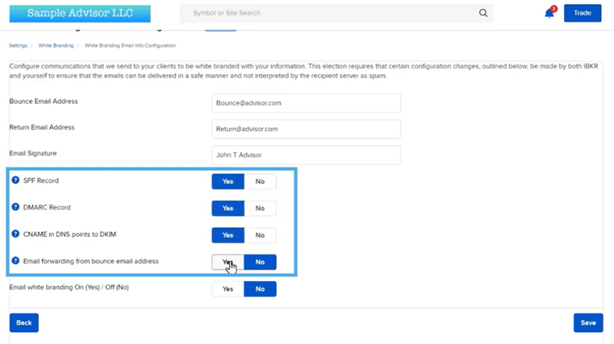
Email white branding allows advisors to specify bounce and return email addresses, as well as their email signature. Additional configuration steps are required to ensure proper email delivery. The Contract Database section enables customization of product search page, while the User Guide section provides a link to a generic version without IBKR branding (IBKR Traders´Academy, s.f.).
The Trader Workstation (TWS) section allows advisors to customize the desktop trading platform with their logo and company information. This includes adding contact details for customer service and technical support, as well as useful links in the TWS Help menu (IBKR Traders´Academy, s.f.). After configuration, advisors need to provide their clients with specific links to download and install the white-branded TWS.
Overall, White Branding feature offers registered advisors a straightforward way to personalize the IBKR software with their organization’s identity and information, enhancing their professional presence and client experience.